Cradlepoint Load Balancing Algorithms
This article explains the four Load Balancing alogrithms available on supported Cradlepoint endpoints.
Quick Links
Use the following links to quickly navigate through this document.
Summary
Requirements
Spillover Load Balancing
Round-Robin Load Balancing
Rate Load Balancing
Data Usage Load Balancing
Related Articles/Links
Load Balancing allows multiple WAN connections to be used concurrently to improve bandwidth reliability with a Cradlepoint endpoint. This feature effectively increases the data transfer throughput by using any connected modem interfaces consecutively. This article explains each of the available load balancing algorithms.
Load balancing is a feature of Connection Manager, available for devices and groups in NetCloud Manager with proper service plan. Your available software features depend on your NetCloud Service Plan, offered in two tiers: Essentials and Essentials+Advanced.
Please refer to the Netcloud Service Plan Features matrix document to understand an individual feature's required license and endpoint compatibility.
For help identifying your endpoint, see the Cradlepoint Connect article Identify Cradlepoint Products.
For information on upgrading NCOS versions, see the Cradlepoint connect article Best Practices for Upgrading Cradlepoint Modem and NCOS Firmware.
IMPORTANT: Although a single modem can contain two SIM slots, each modem can only connect to one SIM card at a time. Therefore, you cannot load balance between two SIM cards in the same cellular modem. Load balancing requires two cellular modems, with at least one SIM card in each modem.
This is the default load balancing algorithm. Cradlepoint endpoints do not perform aggregate, channel-bonded load balancing. Cradlepoint endpoints attempt to balance modem usage based on the available bandwidth on the attached load-balanced modems. However, the Cradlepoint endpoint doesn't sum the available bandwidths of attached, load-balanced modems and summed bandwidth is not available in online speed tests.
Each modem attached to a load-balanced endpoint has an associated bandwidth value. For example consider two modems in an endpoint, modem A and modem B. In this example, modem A has an available bandwidth of 1Mbps and modem B has an available bandwidth of 2Mbps.
When an IP connection (session) is made from a client device attached to the endpoint, the endpoint checks the available bandwidth of each of its modems. The connection is placed on the modem with the greatest available bandwidth; in this example, modem B. The amount of remaining bandwidth on modem B is recalculated by subtracting the bandwidth required for the connection from modem B's initial bandwidth.
As new IP connections (sessions) are made from client devices, the endpoint again checks modem A and modem B for available bandwidth. If modem B still has more available bandwidth than modem A, then modem B is used for the new IP connections until the connections are terminated. The available bandwidth of each modem is checked each time new IP connections are made. Modem A won't be used until it has greater available bandwidth than modem B.
Based on the above example, we can see that the attached load-balanced modems are not used evenly. The available bandwidth of the modems is also not summed. This issue compounds when there is a large difference in the available bandwidth of the two attached modems. To continue the example, imagine if Modem B was an attached 4G modem, and Modem A was an attached 3G modem. Modem A, the 3G modem, may be only slightly used (or possibly not used at all) depending on the volume of IP connections made from attached client devices. Of course, this would not affect protocols like BitTorrent, which typically use both modems very well due to the high volume of individual IP connections spawned while a torrent is downloading.
When Round-Robin load balancing is selected, NetCloud Manager distributes each request from a client device across the available modems in the endpoint.
When an IP connection (session) is made from a client device attached to the endpoint, each available modem is enumurated. For example, in a dual modem endpoint, imagine there is a modem A and a modem B. No emphasis is placed on the bandwidth available to either modem; instead, the connection is placed on modem A. The next connection is placed in modem B, again, regardless of bandwidth. All connections afterward alternate between the two available modems.
Importantly, the algorithm assumes that each modem is similar (or identical) in capability and bandwidth - and so this would be a drawback if for example Modem A was a 3G modem while modem B was a 4G or even 5G modem. So it is important to only use this algorithm when the two modems in the endpoint are equivalent in their capabilities.
When Rate load balancing is selected, NetCloud Manager distributes the requests from clients to the available modems based on the current upload and download rates.
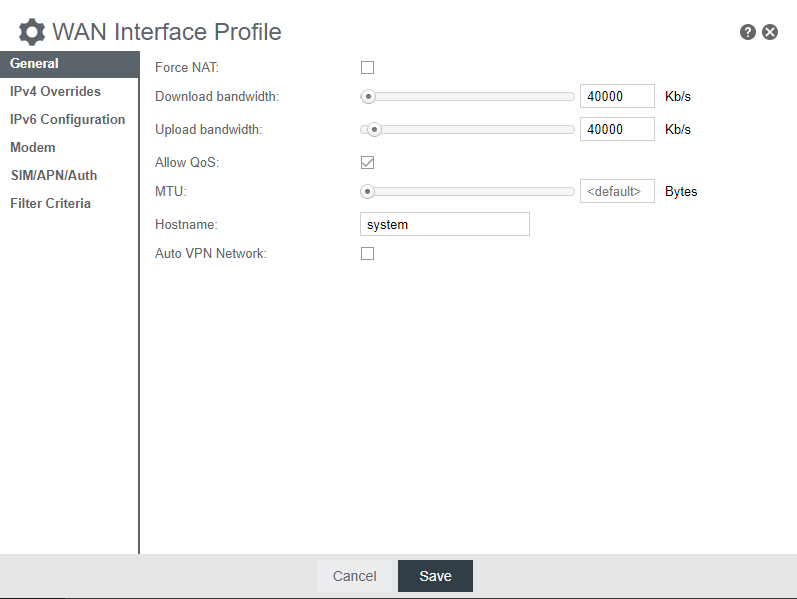
When an IP connection (session) is opened from a client device attached the endpoint, the available upload and download bandwidth are checked. For example, in a dual modem endpoint, imagine modem A is currently set at 40000 kb/s download and upload, while modem B is currently set to 25000 kb/s download and upload. The connection will be placed on the modem with the greatest available bandwidth, just as with Spillover load balancing. However, the difference is that because the download and upload bandwidths are adjustable, disparate modems can still be made to work together to balance the load simply by adjusting the bandwidth values. Imagine that modem A is a 4G modem, while modem B is a 3G modem. By adjusting the bandwidth values to match between the two, no preference is given to one over the other, and so connections are placed on them in alternating fashion.
A WAN device's upload and download bandwidth values can be set on the Connection Manager page.
When Data Usage load balancing is selected, NetCloud Manager attempts to keep data usage roughly equal and below the user-defined values set for each modem.
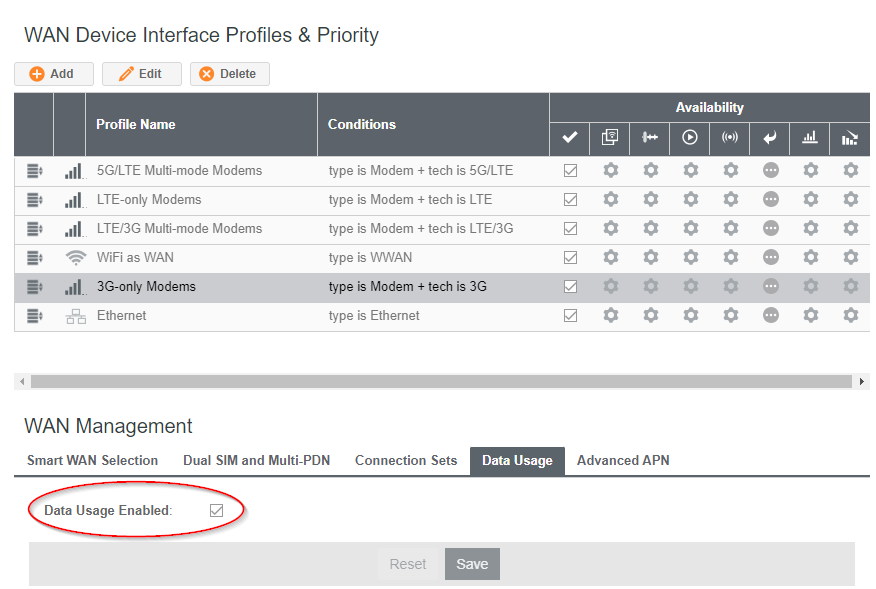
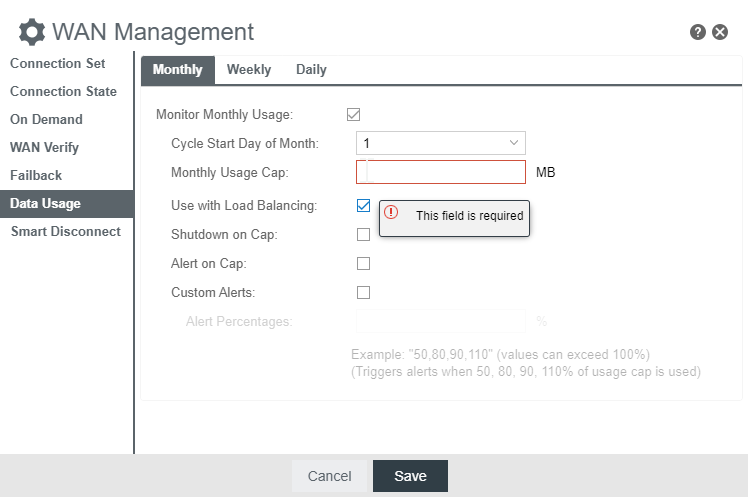
This mode works in concert with the Data Usage feature. The endpoint will make best effort to keep data usage between interfaces at a similar percentage of the assigned data cap in the Data Usage rule for each interface, rather than distributing sessions based solely on bandwidth. For this algorithm to work, you must create data usage rules for each WAN device to be load balanced. Make certain to select the "Use with Load Balancing" checkbox in the rule editor. For more information, see NCOS: How to Configure Data Usage Rules on a Cradlepoint Router.
NOTE: When Load Balance is enabled on a Connection Set, the router will use all set members to increase the data throughput. Adding an interface to an active connection set will automatically connect the WAN interface and add it to the pool of WAN interfaces to use for data transfer. Interfaces configured with different IP modes (e.g. IPv4-only and IPv4+IPv6) will not be load-balanced.